2020年10月20日 星期二

CJMCU-3212 BADUSB board introduction and resource

In order to do the virtual keyboard study, I bought a CJMCU-3212(also called WiFi-Ducky) from Taobao(not yet reach me this moment). As I knew, it is an evaluation board to integrate ATMEGA32U4(Arduino), ESP8266(WiFi) and SD card reader. The well-known BADUSB board is Rubber Ducky USB from HAK5 and it is well documented and easy to find a lot of resources from Web page, Github and Youtube. For CJMCU-3212, no official document and website to mention and support it. I can only collect some information from Chinese website and see some videos from Youtube or Youtube-like site. Here are the information I organized and translated to English for people who interested about it.

Hardware(it integrate three modules)

a. Main module, ATMEGA32U4 to be identified as Arduino Leonardo

b. WiFi module, ESP8266-ESP-12E, to communicate with the system with WiFi

c. SD card module, to read the script inside the SD card for execution

The WiFi module provide an interactive method to input the script and the SD card can store the script for execution instead of the EEPROM of ATMEGA32U4


Pinout(to be updated)


Software

It borrows many codes from Rubber Ducky USB project

a. USB-Rubber-Ducky, for main module

b. wifi_ducky, for WiFi module

c. Duckduino-microSD, for SD card reader

*the default COM setting for ATMEGA32U4 Leonardo 9600N81

*the SD card need to be format as FAT32 and the start-up script name is "script.txt"

*the default WiFi hotspot is called "WiFi Duck" and the default password to access is "quackquack" and the default IP is "192.168.4.1"

*the flasher program for ESP8266 "ESP8266 Flasher_x64", the ROM file for WiFi "esp8266_wifi_duck_4mb.bin”, baudrate setting "115200"


Usage(to be continued... when I got the module)


Reference

https://www.lemonsys.cn/tech_110/

https://www.bilibili.com/read/cv5472965

https://hackaday.com/2014/10/05/badusb-means-were-all-screwed/

https://www.youtube.com/watch?v=G-Z2rf_AN-c

2019年2月28日 星期四

SDR and GNURadio Course Outline 

Hardware

1. What is Radio ? What is Software Defined Radio ?
2. Generalize SDR Architecture
3. The well known SDR platforms
    RTL-SDR, plutoSDR, SDRDuo, HackRF, AirSpy HF+, FunCube Dongle Pro+, KX3, IC7610,     
    Perseus, USRP B205mini, SunSDR2, Flex6500
4. Remote Operation
    WebSDR, OpenWebRX

Software

0. Most used SDR software SDR#, HDSDR, SDR-Console, SDRuno, Linrad, gqrx, GNURadio
1. What is GNURadio  ? What inside of the GNURadio ? What is its capability and Why is it required ?
2. GNU Radio Live SDR Environment (Run without installation)
3. GNURadio installation – Linux and Windows environment
4. GNURadio experiment – examples and practice (basic blocks function and AM/FM radio)
5. Advanced techniques – Out Of Tree (https://wiki.gnuradio.org/index.php/OutOfTreeModules)
6. Q&A and supplements (GRCon and FOSDEM meeting agenda)

FUNcube Dongle Pro+ Block Diagram


HackRF One Block Diagram


SDR Comparison Table


SDR Comparison Table in searchable format
Presentation material: 01_sdr and gnuradio_wjlee20190228_2in1.pdf
(hardware related sheets in black background, software related sheets in blue background and the information related sheets in green background)

GNU Radio Practice          

0. GNURadio Installation
a. Linux Installation
From scratch
Install Dependencies(Ubuntu 18.04 LTS or Mint Tara)
sudo apt-get -y install git cmake g++ python-dev swig  \
pkg-config libfftw3-dev libboost-all-dev libcppunit-dev libgsl-dev \
libusb-dev libsdl1.2-dev python-wxgtk3.0 python-numpy python-cheetah \
python-lxml doxygen libxi-dev python-sip libqt4-opengl-dev libqwt-dev \
libfontconfig1-dev libxrender-dev python-sip python-sip-dev python-qt4 \
python-sphinx libusb-1.0-0-dev libcomedi-dev libzmq3-dev python-mako \
python-gtk2
Installing GNU Radio
git clone --recursive http://git.gnuradio.org/git/gnuradio.git
cd gnuradio; mkdir build; cd build; cmake ../; make; sudo make install
https://wiki.gnuradio.org/index.php/UbuntuInstall

From repository
sudo apt-get install gnuradio

b. Load Gnuradio Live ISO with Virtual machine
     https://www.vmware.com/tw/products/workstation-player/workstation-player-evaluation.html
     https://wiki.gnuradio.org/index.php/GNU_Radio_Live_SDR_Environment


c. Burn Gnuradio Live ISO to USB thumb drive or DVDD
    Unetbootin location https://unetbootin.github.io/
    

d. Install GNURadio in Windows
     http://www.gcndevelopment.com/gnuradio/downloads.htm
      run “*\GNURadio-3.7\bin\volk-profile.exe” to optimization computer performance after the installation
      start GnuRadio Companion(GRC)

1. My first project – Function Generator


Used blocks: Options, Variable, Signal Source, Noise Source, Add, Multiple Const, Audio Sink, QT GUI Range, QT GUI Chooser, QT GUI Sink
GRC file: function generator

2. DTMF Tone Generator


Used blocks: Options, Variable, Signal Source, Selector, Add, Multiple Const, Audio Sink, QT GUI Chooser, Throttle, QT GUI Sink, QT GUI Time Sink, Null Source, Null Sink
GRC file: DTMF Tone Generator

3. X-Y Plot


Used Blocks: Option, Variable, Signal Source, QT GUI Range, Float to Complex, Throttle, QT GUI Sink
GRC file: X-Y plot with QT GUI

4. Tunable Bandpass Filter


Used blocks: Options, Variable, Noise Source, Throttle, Band-Pass Filter Taps, Band Pass Filter, FFT Filter, QT GUI Range, QT GUI Sink
GRC file: Tunable Band Pass Filter

5. AM Demod – From USRP recorded signal


Used blocks: Options, Variable, File Source, Signal Source, Add, Multiply, Multiply Const, Rational Resampler, Complex To Mag, DC Blocker, Low Pass Filter, QT GUI Range, QT GUI Time Sink, QT GUI Sink, Audio Sink
USRP recorded file: am_usrp710.dat (Dr. Katz course project)

6. AM/DSB-SC/USB/LSB Modulation

Used blocks: Options, Variable, Noise Source, Signal Source, Add Const, Multiply, Selector, Low Pass Filter, Band Pass Filter, QT GUI Chooser, QT GUI Time Sink, QT GUI Sink

7. RTL-SDR FM tuner

    RTL-SDR driver installation for GNU Radio(Zadig)    


Used blocks: Options, Variable, RTL-SDR Source, Multiply Const, Low Pass Filter, WBFM Receiver, Rational Resampler, QT GUI Range, QT GUI Time Sink, Audio Sink, QT GUI Sink, QT GUI Waterfall Sink
GRC file: RTL-SDR FM Tuner

Gnuradio experiments collection: gnuradio experiments.zip
Presentation material for the experiment: 02_gnuradio experiments_wjlee20190228_2in1.pdf
Where to find more useful information: 03_grcon and fosdem_20190228_2in1.pdf

2018年4月6日 星期五

Black Pill(STM32F103C8T6) to work with Arduino

The Black Pill is a STM32F103C8T6 based controller board with 64K Flash, 20K SRAM, 2x 12-bit ADC, 2x SPI, 2x I2C, 2x USART, 1x USB and 5V-tolerant I/O. It cost 2 to 3 USD from Ebay or Taobao. As its name, Black Pill's PCB color is black and there are different variant called Blue Pill, and Red Pill. From the schematic, you can see the indication LED is connected to PB12. When PB12 is assigned to "0", it will turn-on the LED.


To program the Black Pill, you can use the UART(bootloader) or ST-Link. In addition, you can also use the USB interface, but you need burn the USB bootloader to it in advance. The procedure to work Black Pill with Arduino IDE and USB interface is shown below

1. Burn USB Bootloader

a. Set the BOOT1/BOOT0 as 0/1
b. Prepare a USB-2-UART cable and connect PA9/RX, PA10/TX, +3.3V and ground
d. Start ST flasher loader and upload the firmware
** The setting and connection between Black Pill and USB-2-UART cable need assign properly, otherwise the flash loader program will not go the burn process. The connection and operation menu is displayed.


2. Arduino IDE to support the STM32

a. Get Arduino_STM32 from github and put it over
"C:\Users\<login username>\Documents\Arduino\hardware"
(my example C:\Users\vincentlee\Documents\Arduino\hardware\Arduino_STM32)
b. run "C:\Users\vincentlee\Documents\Arduino\hardware\Arduino_STM32\drivers\win\install_drivers.bat"
to install the driver or you will see error in Arduino upload.
c. Start the Arduino IDE to select and check the Black Pill is supported. The "Get Board Info" menu can show the board information

d. Load the "blink" example, edit the indication LED pin to "PB12" for Black Pill


e. Set the BOOT1/BOOT0=0/0 to boot for flash memory and connect the Black Pill thru USB

f. Compile and upload the Sketch to Black Pill
If the "blink" Sketch is uploaded properly, it will turn-on the LED for 3 sec and turn-off LED for 1 sec continuously.


 If the DFU driver is not installed in procedure 2/b, then the error message
"Couldn't find the DFU device:[1EAF:0003]" is displayed and the upload process failed.

Q&A

1. STM32F103C8T6 part number naming rule
STM = the vendor, STMicroelectronics
32 = 32-bit, i.e. ARM series
F103 = model, “F1” also indicates that this is an ARM Cortex M3
C = 48-pins
8 = flash memory size is 64 KB(B series with 128KB flash and it seems share the same dice as 8 series)
T = package type is LQFP
6 = temperature range -40 to +85 °C

2. BOOT1/BOOT0 selection
From ST's datasheet, it worked as
Boot mode selection pins Boot mode Aliasing Note
BOOT1 BOOT0
x 0 Main Flash memory Main Flash memory is selected as boot space USB bootloader burned to work with Arduino IDE
0 1 System memory System memory is
selected as boot space
USART bootloader
1 1 Embedded SRAM Embedded SRAM is
selected as boot space
SRAM boot for debug

3. The board's COM port is not shown in programming
Sometimes, the used-to-work Black Pill is not function properly to show the COM port anymore. You can try to reset the board or load again the DFU driver again as procedure 2/b

4. reference link
a. Roger Clark's github
    https://github.com/rogerclarkmelbourne
b. stm32duino wiki
    http://wiki.stm32duino.com/index.php?title=Black_Pill
    http://wiki.stm32duino.com/index.php?title=Blue_Pill
    http://wiki.stm32duino.com/index.php?title=Maple_Mini
    http://wiki.stm32duino.com/index.php?title=Red_Pill

2017年7月23日 星期日

Digilent Analog Discovery Kit

Digilent Analog Discovery Kit(ADK in short) is an integrated instrument including
a. 2 channels oscilloscope
b. 16 channels logic analyzer
c. 2 channel arbitrary waveform generator(AWG)
d. 16 channels pattern generator
e. +/- 5V, 50mA power supply


2. TRM - pcb, IC list - overkill for provided components
Top side of the ADK PCB

Bottom side of the ADK PCB
3. software feature - FFT, SA, AWG, PG
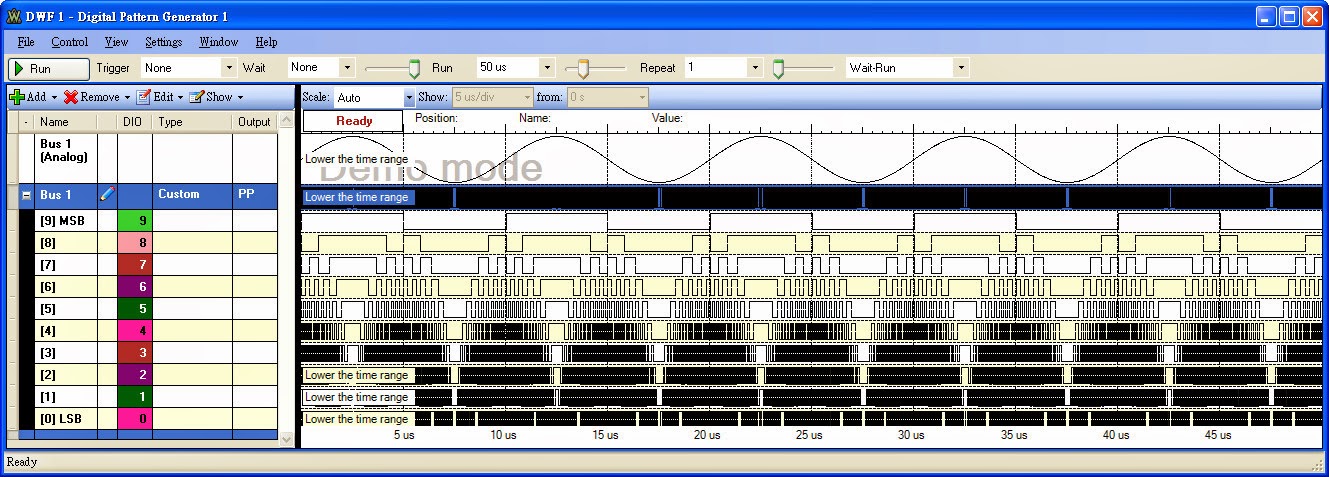
4. personal application - BERT, long record pattern generator,

10-bit digital sinewave generation
Matlab code
==========
% pattern file generation for Digilent Analog Discovery Kit
% 2013/01 wjlee
clear;
close all;
%the file format for Waveforms's pattern generator
%line1(header): Bus 1,[9] MSB,[8],[7],[6],[5],[4],[3],[2],[1],[0] LSB
%line2: b0000000000,0,0,0,0,0,0,0,0,0,0
%line3: b0000000001,0,0,0,0,0,0,0,0,0,1
%line1025: b1111111111,1,1,1,1,1,1,1,1,1,1
reclen=1000; %the patgen record length(max=1024)
adcbit=10;   %ADC resolution
dacbit=10;   %DAC resolution
theta=0:2*pi/reclen:2*pi*(1-1/reclen);
adcfull=2^adcbit-1;
dacfull=2^dacbit-1;
amp=round(dacfull*(sin(theta)+1)/2);
plot(amp);
hold on;
grid on;
plot(amp,'r.');
axis([1 reclen 0 dacfull]);


%write data to file
disp('     ');
disp('Generate the "pgenw.csv" for Digilent Analog Discovery Kit Pattern Generator');
disp('     ');
%pgenw='pgenw.csv';
%fid1=fopen(pgenw,'w');
fid1=fopen('pgenw.csv','w');
if dacbit==10
   fprintf(fid1,'Bus 1,[9] MSB,[8],[7],[6],[5],[4],[3],[2],[1],[0] LSB \n','  ');
   ampbin=dec2bin(amp,10);
   for i=1:reclen,
     fprintf(fid1,'b%s,%s,%s,%s,%s,%s,%s,%s,%s,%s,%s \n',ampbin(i,:),ampbin(i,1),ampbin(i,2),ampbin(i,3),ampbin(i,4),ampbin(i,5),ampbin(i,6),ampbin(i,7),ampbin(i,8),ampbin(i,9),ampbin(i,10));
   end
end;
fclose(fid1);
%if dacbit==9 then
%   fprintf(fid1,'Bus 1,[8] MSB,[7],[6],[5],[4],[3],[2],[1],[0] LSB \n','  ');
%end;
%if dacbit==8 then
%   fprintf(fid1,'Bus 1,[7] MSB,[6],[5],[4],[3],[2],[1],[0] LSB \n','  ');
%end;
==========


FAST - Five hundred meter Aperture Spherical Telescope

FAST In the Wikipedia
https://en.wikipedia.org/wiki/Five_hundred_meter_Aperture_Spherical_Telescope

The formal website of FAST
http://fast.bao.ac.cn/en/Receiver.html


The FAST cover frequency range from 70MHz to 3GHz with multi-beam, multi-band receiver


The comparison to Arecibo and FAST

The Feed Cabin Suspension System